Network Policies
Visualize and manage Kubernetes network policies that control traffic between pods in your cluster.
Overview
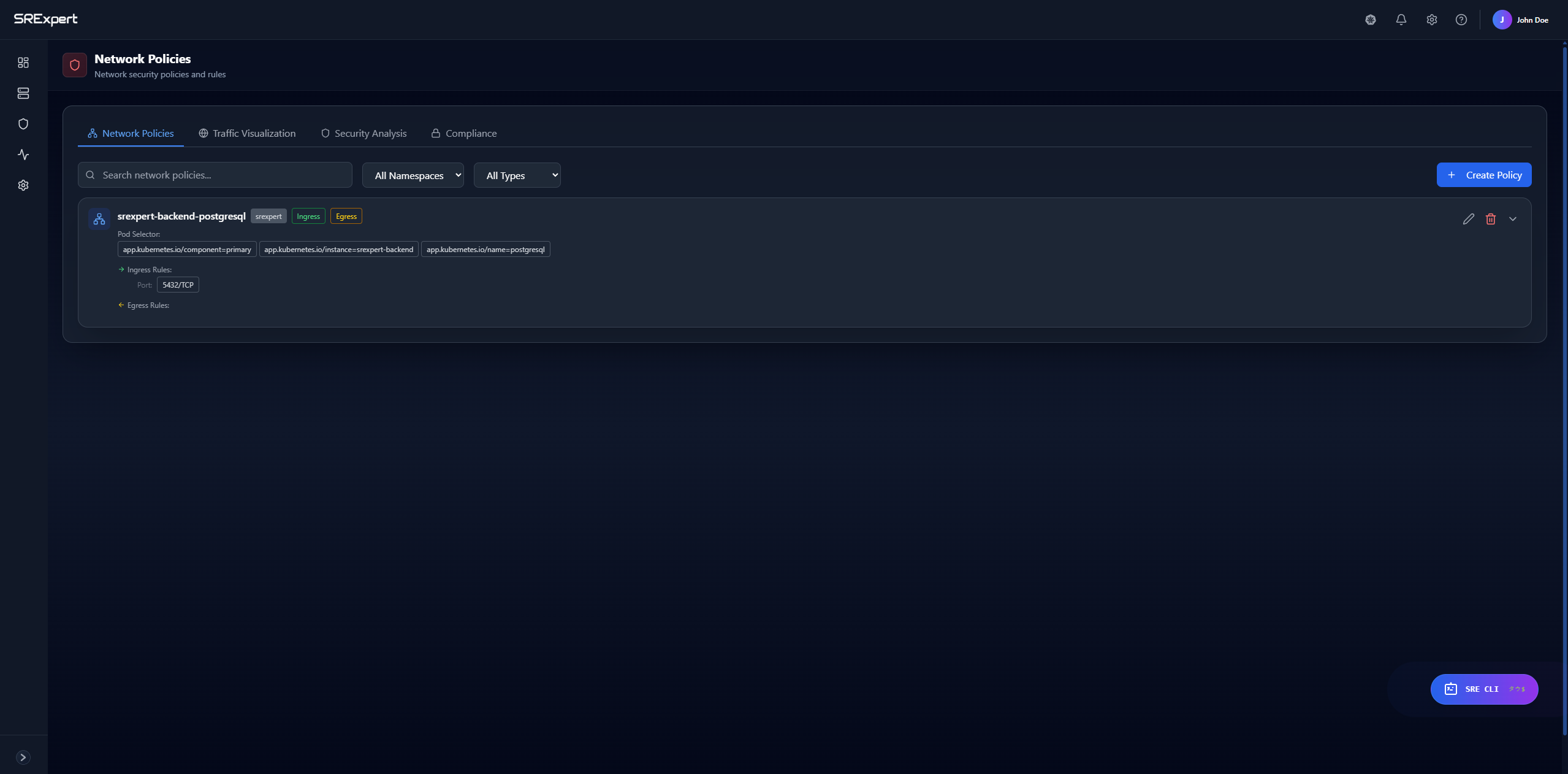
The Network Policies page lives under Security > RBAC & Access, and is also reachable from Workloads (network policies are a workload-level resource). It is organized into four tabs:
- Network Policies - list the policies in your cluster and create new ones
- Traffic Visualization - visualize how your policies relate to pod-to-pod connectivity
- Security Analysis - review your network security posture and policy coverage
- Compliance - check network policies against compliance expectations
What are Network Policies?
Network Policies control traffic flow between pods:
- Default: All pods can communicate with each other
- With policies: Traffic is restricted based on rules
Note: Network Policies are only enforced by a CNI that supports them (Calico, Cilium, Weave, etc.). Without such a CNI, policies can still be created and viewed, but they will not actually restrict traffic.
Network Policies Tab
Policy List
The Network Policies tab lists every policy in your cluster. For each policy you can see:
| Column | Description |
|---|---|
| Name | Policy name |
| Namespace | Applied namespace |
| Pod Selector | Affected pods |
| Ingress Rules | Inbound traffic rules |
| Egress Rules | Outbound traffic rules |
List Controls
The toolbar above the list helps you find the policy you need:
- Search - filter policies by name
- All Namespaces - narrow the list to a single namespace
- All Types - filter by policy direction: All Types, Ingress Only, or Egress Only
- + Create Policy - open the editor to define a new policy
Policy Details
Select a policy to inspect its full definition, including:
- Full YAML specification
- The pod selector and matched pods
- Ingress and egress rules
Other Tabs
Traffic Visualization
The Traffic Visualization tab helps you visualize your network policies and the pod-to-pod connectivity they govern, making it easier to understand which workloads a policy applies to and how they relate to each other.
Security Analysis
The Security Analysis tab helps you review your network security posture, such as which workloads are covered by policies and where coverage may be missing.
Compliance
The Compliance tab helps you check your network policies against compliance expectations for your environment.
Creating Policies
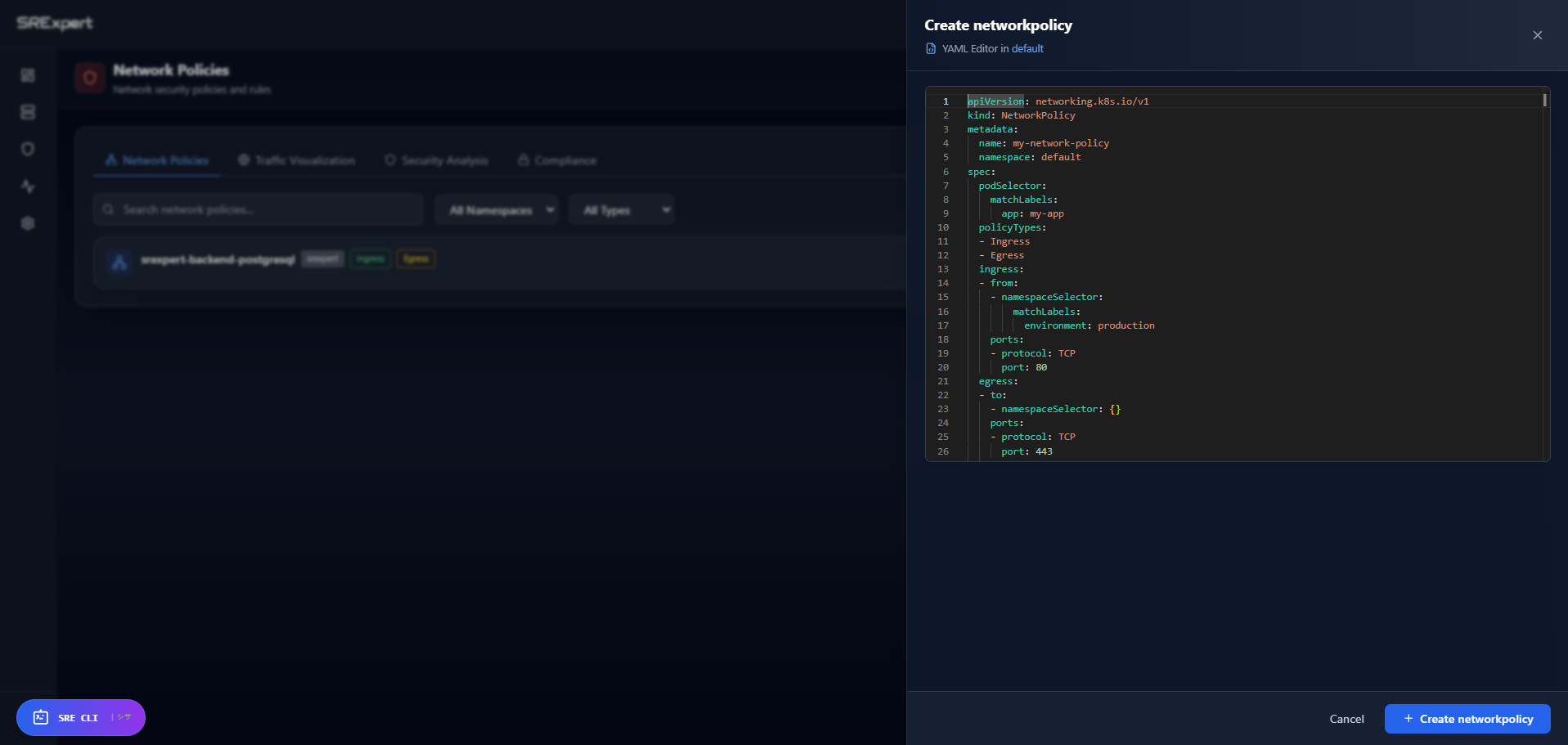
Using the Editor
- Open the Network Policies tab
- Click + Create Policy
- Fill in the policy definition:
Basic Info
- Name
- Namespace
- Description
Pod Selector
- Select pods to apply the policy to
- Use labels for selection
Ingress Rules
- Who can send traffic to these pods
- Which ports are allowed
Egress Rules
- Where can these pods send traffic
- Which ports are allowed
- Review and create
Using YAML
Create directly from YAML:
apiVersion: networking.k8s.io/v1
kind: NetworkPolicy
metadata:
  name: allow-frontend
  namespace: production
spec:
  podSelector:
    matchLabels:
      app: backend
  policyTypes:
  - Ingress
  ingress:
  - from:
    - podSelector:
        matchLabels:
          app: frontend
    ports:
    - protocol: TCP
      port: 8080
Common Patterns
Deny All Traffic
Block all traffic by default:
apiVersion: networking.k8s.io/v1
kind: NetworkPolicy
metadata:
  name: deny-all
spec:
  podSelector: {}
  policyTypes:
  - Ingress
  - Egress
Allow Same Namespace
Allow traffic within namespace only:
apiVersion: networking.k8s.io/v1
kind: NetworkPolicy
metadata:
  name: allow-same-namespace
spec:
  podSelector: {}
  ingress:
  - from:
    - podSelector: {}
  policyTypes:
  - Ingress
Allow from Specific Namespace
apiVersion: networking.k8s.io/v1
kind: NetworkPolicy
metadata:
  name: allow-from-monitoring
spec:
  podSelector: {}
  ingress:
  - from:
    - namespaceSelector:
        matchLabels:
          name: monitoring
  policyTypes:
  - Ingress
Allow DNS
Allow DNS resolution (usually needed):
apiVersion: networking.k8s.io/v1
kind: NetworkPolicy
metadata:
  name: allow-dns
spec:
  podSelector: {}
  egress:
  - to:
    - namespaceSelector: {}
    ports:
    - protocol: UDP
      port: 53
  policyTypes:
  - Egress
Reviewing Coverage and Connectivity
Beyond the policy list, use the other tabs to understand the effect of your policies:
- Traffic Visualization helps you see your policies alongside the pod-to-pod connectivity they govern.
- Security Analysis helps you spot workloads that lack policy coverage.
- Compliance helps you confirm your policies meet your network compliance expectations.
Note: Kubernetes-native NetworkPolicy does not provide a log-only or “audit” mode. A policy is either applied (and enforced by a supporting CNI) or it is not. Test changes in a non-production namespace before rolling them out widely.
Troubleshooting
Policy Not Working
- Verify CNI supports Network Policies
- Check pod labels match selectors
- Ensure policy is in correct namespace
Pods Can’t Communicate
- Check if a deny-all policy exists
- Verify ingress/egress rules
- Use the Traffic Visualization tab to inspect connectivity
DNS Not Working
- Add egress rule for DNS (port 53)
- Check kube-system namespace access
Best Practices
- Start with deny-all - Add explicit allows
- Allow DNS first - Most apps need it
- Test in staging - Before production
- Use namespaces - Logical separation
- Document policies - Use descriptions
Next Steps
- Security View - Security overview
- Gatekeeper & Policies - OPA policies
- Troubleshooting - Debug issues