Secrets Scanning
Scan your Kubernetes cluster for exposed secrets and credentials that could pose security risks.
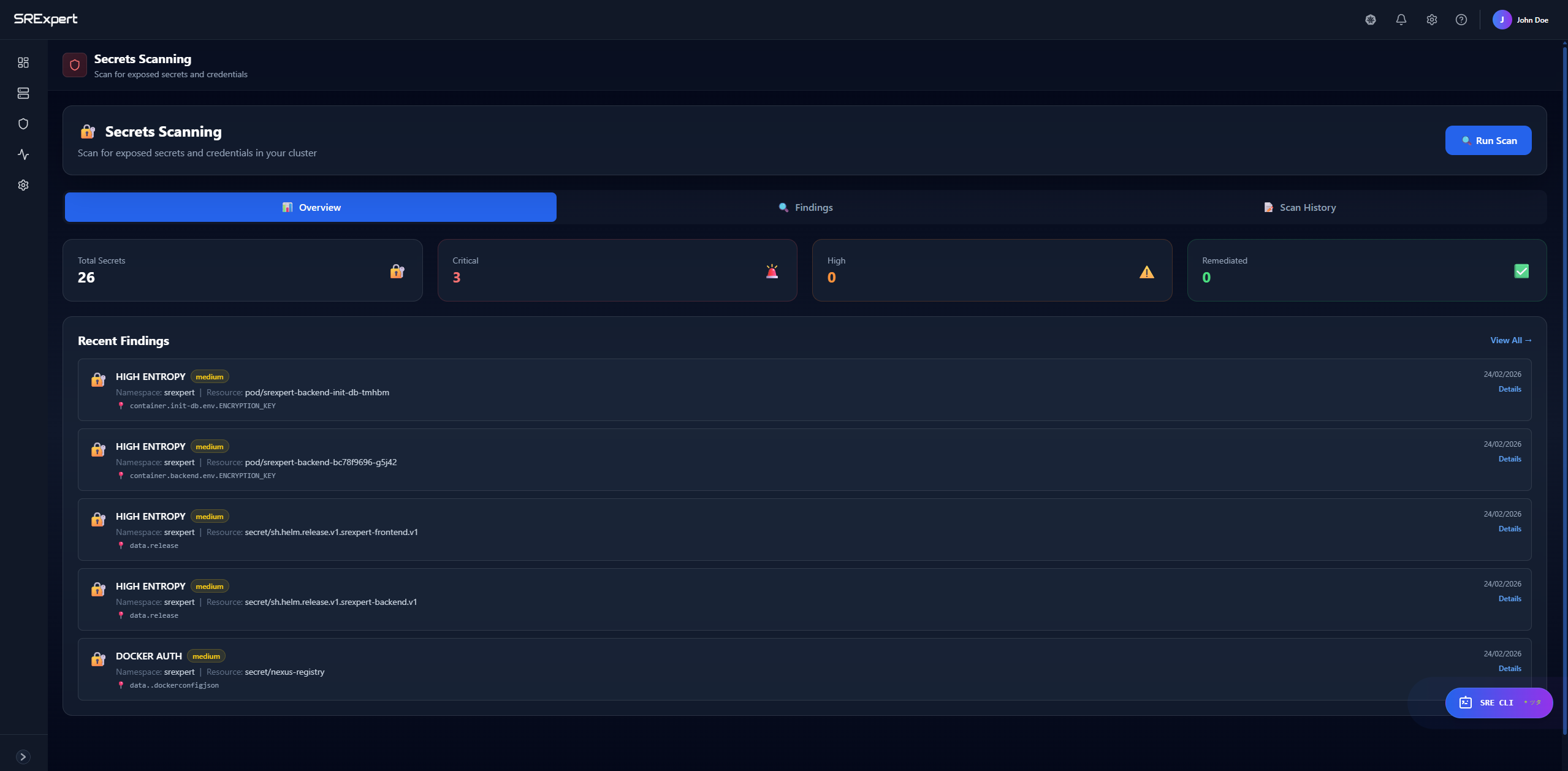
Overview
Secrets Scanning helps you identify exposed credentials, API keys, tokens, and other sensitive information that may be unintentionally exposed in your Kubernetes resources. This includes scanning ConfigMaps, environment variables, and other configurations where secrets might be accidentally stored in plain text.
Scoped per cluster: Secrets scanning results are shown per cluster. Use the cluster selector at the top of the page to choose a specific cluster, or select All clusters for an aggregated view.
Dashboard Tabs
| Tab | Description |
|---|---|
| Overview | Summary of scan results and recent findings |
| Findings | Detailed list of all discovered secrets |
| Scan History | History of previous scans |
Metrics
The overview shows key metrics:
- Total Secrets - Number of potential secrets found
- Critical - High-risk secrets requiring immediate action
- High - Important secrets to address soon
- Remediated - Secrets that have been fixed
How to Use
Running a Secrets Scan
- Navigate to Security > Security Scanning > Secrets Scanning
- Click the Run Scan button in the top right
- Wait for the scan to complete
- Review findings in the dashboard
Reviewing Findings
- Click on the Findings tab
- Browse the list of discovered secrets
- Click on a finding for details:
- Location (namespace, resource)
- Type of secret detected
- Recommended remediation
Secret values are never displayed. For security, the actual secret value is always masked and shown as
***REDACTED***. Findings tell you where a secret was detected and what type it is, without exposing the credential itself.
Viewing Scan History
- Click on the Scan History tab
- See when scans were run
- Compare results over time
Types of Secrets Detected
| Type | Examples |
|---|---|
| API Keys | AWS keys, GCP credentials, Azure tokens |
| Passwords | Database passwords, service credentials |
| Tokens | JWT tokens, OAuth tokens, bearer tokens |
| Private Keys | SSH keys, TLS certificates |
| Connection Strings | Database URLs with credentials |
Best Practices
- Use Kubernetes Secrets - Store sensitive data in Secret resources, not ConfigMaps
- External Secret Management - Consider tools like Vault, AWS Secrets Manager
- Regular Scanning - Run scans regularly to catch new exposures
- Immediate Remediation - Address critical findings immediately
- Rotate Exposed Secrets - If a secret is exposed, rotate it immediately
Remediation Steps
When a secret is found:
- Assess Impact - Determine if the secret was actually exposed
- Rotate Secret - Generate a new secret/credential
- Update References - Update all applications using the secret
- Move to Secrets - Store in Kubernetes Secrets or external vault
- Rescan - Verify the issue is resolved
Next Steps
- Image Security - Scan for vulnerabilities
- Misconfigurations - Check compliance